The last bag I’ll ever own

My wife recently surprised me with a new laptop bag she had commissioned as a custom job, using my old German military backpack that had been gathering dust in the garage as raw material for the project.

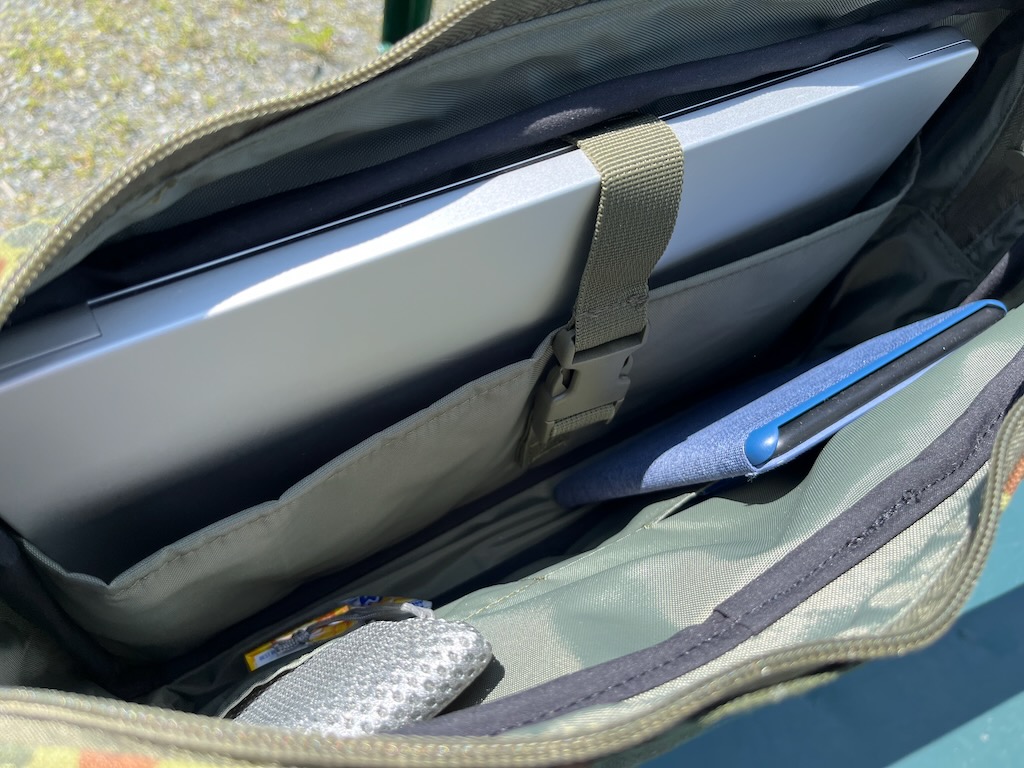
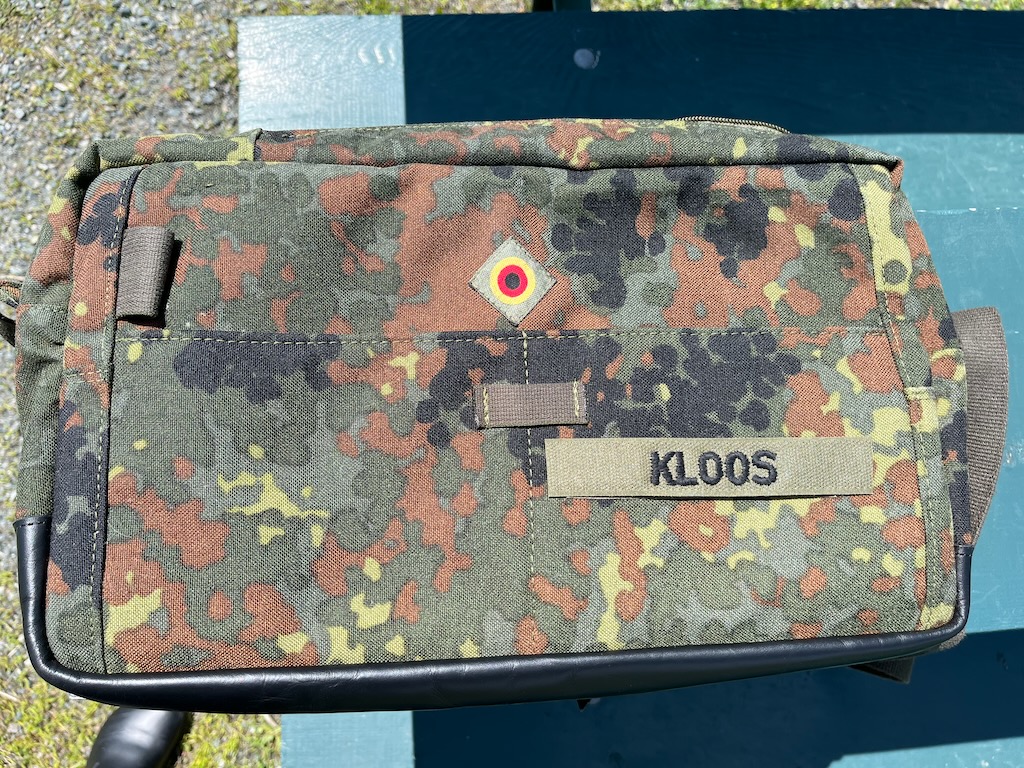
I’ve always been picky about bags, and most of them tend to fall down in at least one category between material, layout, size, craftmanship, or durability. This one is the first that ticks all the boxes for me. It’s the perfect size, just big enough for a 14″ laptop. The internal layout is exactly as I would have designed it, the stitching and detail work are superb, and the material (being from a military backpack) is ridiculously sturdy. They even used one of the backpack straps as the carry strap, repurposed one of the outside gear pockets as an accessory pouch, and used one of the original buckle straps for the laptop compartment. And to top it all off, they sewed on a velcro strip, reattached my old name tape, and took the flag rondel off my old field cap and put it on the messenger bag.

I’m super happy with the end result, and I’ve retired all my other (store-bought) bags. The custom material and detail work makes this a unique one-off, and I believe this is the first time this company used that particular bag pattern, so there’s no other bag like it out there.

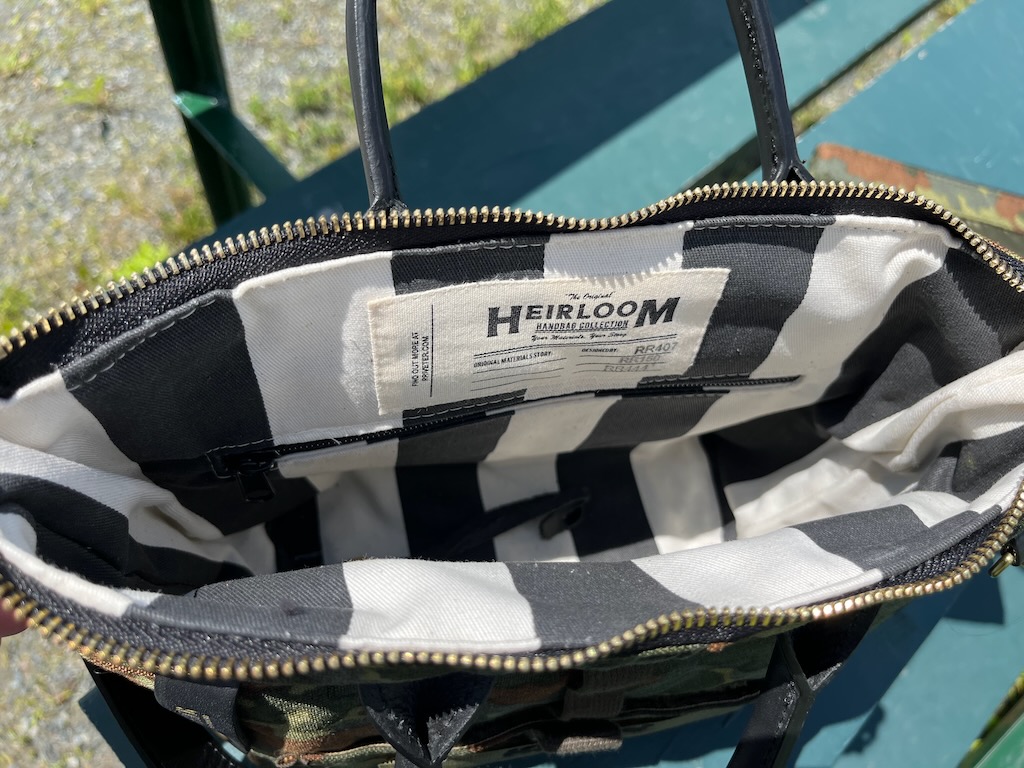
The company my wife approached with this commission is R.Riveter, for those of you who are curious. This is from their “Heirloom” line, where they take materials supplied by the customer and turn them into custom bags. They’re based in North Carolina and employ military spouses for their bag collection. (This isn’t a paid pitch–my wife paid full fare for their work.) They make mostly handbags and other bag patterns oriented towards women, but they’re thinking about making that messenger bag a regular item. I thought I should give them a shout-out because of the excellent work they did on this bag.

Here are some pictures:
My wife had them make her a bag out of the same material, which also turned out very well.



Spicy Pillow Syndrome

I was typing on my old MacBook Pro today and noticed that the bottom case was wobbling back and forth a little despite being on a flat desk.

I grabbed my trusty iFixit toolkit, took off the case bottom, and found this:


That’s what we call a “spicy pillow”, a lithium-ion battery that has chemically degraded to the point of releasing gas. The only way to fix it is to (carefully) remove the battery and professionally dispose of it because it’s a fire hazard.

Sadly, the battery pack in this model is glued into the case with a strong adhesive. To get it out, I’d have to disassemble pretty much the entire bottom case and then loosen the adhesive with solvent, all the while working around a battery that may turn into a tiny volcano if it’s pierced by a screwdriver or the corner of a spudger by accident. That’s $100 or so for a new battery, plus two or three hours of tricky labor, all to fix a laptop that I bought in 2017. I decided not to spend the time, money, and effort to keep a 9-year-old laptop going, so I pulled out the SSD storage, closed the case again, and set it aside for disposal.

I used that MacBook Pro pretty steadily for the last seven years, so I’d say I got my money’s worth out of it. Still, it has traveled to a lot of places with me, and I wrote more than one novel on it, so I’m a little bummed to have to retire it. It couldn’t run the latest MacOS anymore, but it was still working just fine for daily computing. Alas, it’s not safe to use like this anymore, so out to the great computer lab in the sky it goes.

The trusty Battlestar

This beast is five years old this month. I bought it in December of 2017, and it’s been a rock-solid workhorse ever since. When I configured it online, I picked all the top-shelf options, which is probably the reason for its longevity. (For the tech nerds, it’s an Alienware AW17R4 with a Core i7-7820HK, 32GB RAM, a GTX 1080, and a 120Hz QHD G-Sync panel with Tobii eye-tracking.) It’s built like a tank and weighs over ten pounds, so it’s less a “laptop” and more of a compact all-in-one you can move easily between rooms. But since it lives on a desk most of the time and hardly ever gets used out of my office, the weight and size aren’t a drawback. (If I want to take my work out of the house with me, I have much more portable devices for that.)

Because of the maxed-out hardware, the price was top-shelf as well–I think I shelled out $2,500 at the time. But I think that expense has paid off over the years because it hasn’t flinched at anything I’ve thrown at it, and it still plays everything I want to play. I guess I’ll keep using it until it either breaks or it can’t play the latest hotness in games at decent frame rates anymore, at which point I’ll semi-retire it or give it to one of the kids and replace it with another high-end gaming laptop that will last for half a decade. For now, it’s still trucking right along even after five years of daily use and more logged hours in Flight Simulator than I want to admit in public.


Military time in the civilian world

IMG 4327

Out of idle curiosity this morning, here’s a question for those of you who have served in the military:

How many of you are still using 24-hour and DDMMYYYY calendar format on your digital devices?

I turned in my kit 28 years ago this month and I still do it. My digital watches are all set to military time, and so are all my computers. Of course, it comes easier to someone who grew up in Europe because of the far more common use of 24-hour time over there, so everyone’s fluid in both notations. (In conversation, people in Germany tend to use 12-hour time, but all the timetables and airport status displays and such are in 24-hour time.)

When I got this Suunto Core, I was pleased to find that not only does it let you use 24-hour time (which is a common feature on digital watches) but also the DD.MM format for the date (which is far less common; watches sold in the US overwhelmingly feature the MM.DD notation.) Because even though I am fluent in imperial measurements and the AM/PM notation after 26 years here, my brain still wants to read the date the military way, day followed by month followed by year.

From the Castle Frostbite IT department

IMG 4322IMG 4323

Robin’s iMac started giving her the Beachball of Death, hanging up on almost everything she tried to do with it. I used to be a hardware tech support guy and systems administrator, so I am the official Castle Frostbite IT department. In that function, I diagnosed the iMac and suspected that the hard drive was failing.

$90 for a repair kit and two hours later, the iMac has been rejuvenated with an SSD. I also gave it a thorough interior cleaning while I had the screen off. It’s not a terribly difficult repair with the right tools—the hardest part of the operation is to line up the strips for the new screen adhesive and then putting the screen glass back on perfectly aligned because once the glass touches the adhesive, it doesn’t want to move again.

I bought this iMac in mid-2014 and maxed out all the specs when I ordered it. It’s a Core i7 with 16GB of RAM and a GeForce GTX780, and now it’s faster than it was in its new state because it’s booting the operating system and running applications off an SSD and not the fusion drive it came with originally. For the stuff Robin does with a computer, it will probably last her for another two or three years, so I’d say I got my money’s worth out of that purchase. One of the nice things about Macs is that they stay useful far longer than their PC counterparts. That useful period is much extended when you future-proof the computer by buying the highest specs you can afford.

That goes doubly for iMacs because they are NOT designed for end-user upgradeability. They have a handy little trapdoor for replacing RAM, but that’s as far as Apple wants you to do things yourself. To get at any interior components, you have to cut the adhesive that holds the screen, pop the whole big glass panel off, and hope you don’t have to sneeze when it’s time to stick it back on.

Still, it’s satisfying to flex the old IT Guy muscles every now and then and Fix a Thing. So much of my day revolves around sitting at a desk and having conversations with imaginary people that it’s nice to be able to get out the special tool kit and engage in some manual tinkering that fixes a problem with a physical object.

More Tik-Toks

Someone asked about the rest of the collection in comments, so here you go.

It’s a modest collection of nice-but-not-outrageous watches as far as price goes. The whole case is worth less than a single basic Omega or Rolex. Not that I would mind owning a Seamaster or a Submariner, but I don’t think I’ll ever be able to bring myself to spend five or ten grand on a watch. (My answer may change if someone ever gives me a truck full of cash for movie rights or something.)

Top row, left to right: Mondaine Quartz Classic, Orient Defender, Island Watch Aviator, and a Borel that’s a high quality Swiss Datejust homage.

Bottom row, left to right: Orient Mako, Junkers G-38 GMT, Arctos/GPW Titanium Einsatzuhr, and a Phoibos Proteus with a meteorite dial.

The oldest watch in that case is the two-tone Borel on the top right, which I got as a Christmas gift from my mother-in-law about 15 years ago. The youngest one is the Phoibos on the bottom right, which I bought with some of the Netflix money from my Love Death + Robots contributions.

Not pictured are the half dozen Casios I keep in my nightstand drawer…several G-Shocks, two Edifices, and a few fun cheapies that are great as beater watches. Those don’t go into a watch case because that would be silly, and also because I don’t want to buy another watch case. I never thought I’d even fill that 8-slot one, but it turns out that once you get bitten by the horology bug, you tend to accumulate more.

Posting a TikTok

Eight years ago, when Terms of Enlistment started selling a lot of copies, this $45 Casio Duro was the first “extravagant” purchase I made with some of the first windfall royalties.

Fast-forward to 2021, eight years and ten novels later, and I own a lot more watches, but I still wear this one a lot. It’s a reminder that I don’t need to spend a bunch of money to take pleasure in something, and that once upon a time, spending $45 on something I didn’t strictly need was a frivolous luxury.

(It’s also a damn good watch in its own right and easily the best sub-$100 dive watch on the market. It’s tough, unpretentious, accurate, and reliable, all properties worthy of emulation.)


View from the factory floor

On the rare occasion of a neat and cleaned-up desk, here’s a picture. Does this ever scream “science fiction writer at work”, or what?

The eagle-eyed among you will notice that all the gear is Alienware-branded, which means you can probably guess that I occasionally use it for pursuits other than the typing of sentences and paragraphs and so on. That beast of a laptop is a 17-inch AW17R4, which I bought three years ago with all the configurable specs maxed out as far as possible. It still tears through everything I throw at it, so I am guessing it’ll probably serve me a few more years before I’ll think about upgrading. It weighs over ten pounds because it’s built like a tank, so I don’t really use it as a laptop. Instead, it’s sort of a portable desktop with a backup screen and a built-in uninterruptible power supply.

The monitor is a recent addition. It’s a 34-inch ultrawide, which is the berries for editing and revising because it lets me have two full-sized application windows open side by side. It’s also the berries for gaming because a 21:9 display at this size is ludicrously immersive. Once you are used to one, going back to a 16:9 screen feels like wearing blinders.

Peripherals are hardwired because input lag kills, and they’re Alienware as well because I like it when everything matches.

Anyway, that is where the sausage gets made these days. I have a lightweight 2-in-1 Windows laptop for writing on the go, but there isn’t much of that going on at the moment, so I only use it whenever I want to chat with friends or browse the web from the recliner. My writing software is still Scrivener, which has been my main first draft tool ever since I started writing novels. Revisions and edits are done in Microsoft Word, which is the de facto industry standard, but I don’t like doing first drafts in Word for anything longer than a chapter or a short story because Word doesn’t let me organize and reshuffle chapters like Scrivener does. (I’ve been using the Scrivener 3 beta for Windows since the very early versions, and it hasn’t crashed on me once.)

Not in the picture are my corkboard, where I pin index cards with ideas and frequently used reference data, and my whiteboard, which holds my color-coded sticky notes for the individual chapters of the current draft. While those would make interesting visuals, one has a lot of personal information on it and the other would comprehensively spoil CITADEL, the third book in the Palladium Wars.

There you have my view on most days. It’s not a cool Manhattan loft office looking out over 31st Street or anything, but it’s quiet, the coffee is much cheaper, and I have everything I need right where I want it.

World shut-outers

I bought these Bose QuietComfort 35 headphones more than four years ago, and I’ve used them almost every day. Now the battery holds a fraction of its original charge, and the earcup cushions have started to separate. I could get new cushions, but the battery isn’t user-replaceable, so it’s probably time to retire these.

When you have a home office in a house with two kids (who have done their schooling online since well before the pandemic) and three dogs (who take special delight in “chasing off” passing trucks on our road with their mighty bark chorus), noise-cancelling headphones are a life- and sanity-saver. I usually listen to video game or movie soundtracks while I write, to get into specific moods for a scene, but sometimes I’ll just turn on the noise-cancelling feature and keep things quiet to shut out the rest of the world. These were an expensive piece of tech, and it irks me a little that I can’t just replace the battery easily, but I am not bitter. I got more than my $300 worth out of these over the last four and a half years.

The Switcher

It’s my birthday this week, so I went out and made a frivolous purchase: a Nintendo Switch Lite.

I have always been a PC gamer, but in the last year or two, I’ve found myself gravitating toward consoles. I spend a lot of time in front of mouse and keyboard already, and I don’t really care to do the same thing for relaxation as well. It’s nice to be able to sit in a recliner or on the couch to play. (The console also doesn’t interrupt me with alerts for incoming messages or emails, which makes it easier to focus on the game.)

We already have a Switch in the house, but that one has been co-opted by the kids for a while now. I didn’t really have anything on my gadget wishlist, but the new Switch Lite caught my eye when it was released last month, and I finally got to check a demo model out at Best Buy yesterday. I liked the feel of it, and I already had half a dozen good games for the Switch, so I splurged and got myself a slightly early birthday gift. I also picked up a copy of The Witcher 3 for Switch, which marks the fifth time I’ve bought that game. (I bought it twice for the PC—first on Steam, then on GoG.com to get the exclusive extended game soundtrack that comes with the GoG version—and once for the PS4 and the Xbox.)

Graphically, the Switch version is the weakest one because the Switch just isn’t as powerful as the PS4 or Xbox One S, never mind the gaming PC which can serve it up at 4k resolution. But the reduction in texture quality and resolution isn’t such a big deal on the small screen of the Switch Lite. And there’s something amazing about being able to take the entire game along on a handheld device, expansion packs and all. TW3 is my favorite open-world RPG of all time, and it’ll be fun to play through it again while waiting to pick the girl child up from track practice, or flying across the country.

IMG 2320